Windows laptop updates: why they matter and how much they matter
Updates keep a Windows laptop safe and working: security fixes, repairs, new drivers and firmware, and now and then a new feature. Every Windows version has a last day of support, and every laptop maker sets its own limits for firmware support.
The short answer on Windows laptop updates: security maintenance matters on any laptop that goes online, while changes in speed, memory use and convenience vary with the build, the hardware, the drivers and the workload. Windows laptops also come in many forms. You choose the edition, the chip, the memory, the storage and the maker, and three clocks decide how long the laptop stays useful: Windows support, the maker's firmware support and your own workload. Here is how to read those clocks on a new laptop or a refurbished laptop.
What Windows updates include: five layers
The word 'update' covers five different things, and a problem in one is easily blamed on another.
- Monthly Windows servicing: security fixes and cumulative quality fixes, with some features too. It repairs defects and improves protection, but can introduce a problem on one kind of device.
- Feature release: the named Windows version, such as 24H2 or 26H2, and its support clock. It can be a substantial platform replacement or a small package that switches on code already installed.
- Device drivers: the software that connects Windows to graphics, audio, Wi-Fi, storage and power hardware. A driver fault can look like a Windows slowdown.
- Firmware and microcode: the UEFI or BIOS that starts the laptop, embedded controllers, processor behaviour and early boot trust. It can change stability and security without any visible Windows feature.
- App and service updates: browsers, mail clients, Store apps and cloud features. A changed app is not necessarily caused by the yearly Windows version.
The version number says little about how much changed: Windows 11 24H2 and 25H2 share a servicing branch, and a small enablement package switches on the newer one with a new support period.
Why Windows updates matter: the security fixes you cannot see
Careful habits cannot replace every fix. Security maintenance matters on any supported laptop. Changes in speed, memory demand and convenience vary with the build, the hardware, the drivers and the workload.
Keep two things apart: keeping a supported laptop secure, and adopting every optional new feature the day it arrives. A specific performance fault can justify a targeted fix or a short delay, not giving up security updates for good.
Firmware is sometimes the highest-value update of all, even when Windows looks unchanged. Take Secure Boot: its older 2011 certificates began expiring in June 2026, and Microsoft's guidance covers replacing them. A laptop without the replacements still boots and gets ordinary Windows updates, but may miss future early-boot protections. Secure Boot being switched on does not prove the replacement is done, so current firmware and Microsoft's guidance both matter.
Updates close known weaknesses, and a supported laptop can still be affected by a fault. When support ends, a laptop keeps running but loses its dependable route to security fixes.
How much Windows updates matter depends on how you use the laptop
These are rules of thumb, not measurements.
- Security maintenance: high on any laptop that goes online regularly for work. It depends on a qualifying laptop, a supported Windows version and applicable firmware.
- A critical workflow: high when a lost app, device or session stops your work. Test the exact Windows version and read the known issues first. A faster processor cannot bring back a removed component.
- Responsiveness: high when a measured bottleneck gets in the way. An SSD, enough RAM, healthy drivers, tidy startup items and good cooling usually decide it.
- Administrative control: high for a managed workplace, and it varies at home. It comes from Pro capabilities and configured policies, not from extra speed.
- New interface and AI features: it depends on the feature. What counts is whether it helps you, runs on your hardware and suits your taste. A neural processing unit (NPU) is not a Windows requirement.
A newer Windows version, a Pro licence, a bigger RAM number and an AI badge each meet a different need, so they do not add up to one ranking. Security maintenance is the fixed part. The rest is a choice that follows your work.
How long do Windows laptops get updates? End dates for each version
It depends on the Windows version installed, not on the laptop's age. Windows 11 Home and Pro feature releases normally get 24 months of servicing, Enterprise and Education 36. Microsoft's dates, as of October 2026:
- Windows 11 24H2: Microsoft set the end of servicing for Home and Pro at 13 October 2026. Moving to 25H2 is a small enablement step, so check app compatibility and move soon.
- Windows 11 25H2: supported through 12 October 2027.
- Windows 11 26H2: released on 29 September 2026 and supported through 10 October 2028. It had been public for only eight days in early October, so its reliability cannot be judged yet.
- Windows 11 26H1: a release for selected new hardware, not the normal upgrade for existing 24H2 or 25H2 laptops. It cannot upgrade to 26H2.
- Windows 10: standard support ended on 14 October 2025. Extended Security Updates (ESU) run through 12 October 2027 for eligible, enrolled consumer devices: a security-only bridge with no new features, on terms that vary by country.
Windows leaves more than one path open: a small step to 25H2, a move to 26H2, or an ESU bridge for a Windows 10 laptop while you plan. Check the end date before you delay a feature upgrade.
Laptop maker support starts at release: how much support a used laptop has left
The Windows version has its own support clock. The laptop maker's firmware and driver support is a second one, and no universal promise covers it. Check each maker and model, and ask from what date the count runs.
Microsoft's Surface laptops show how a policy can work. Devices released on or after 1 January 2021 get at least six years of driver and firmware servicing from initial release, earlier models at least four. Buying old stock does not restart that clock. The Surface laptop guide covers the range.
An older laptop must also qualify for Windows 11: a compatible 64-bit processor, 4 GB of RAM, 64 GB of storage, UEFI with Secure Boot and TPM 2.0. Microsoft's PC Health Check and the maker's guidance settle it for a real laptop. A laptop that fails the requirements is not entitled to updates, security updates included, even after an installation bypass. Some still get patches in practice, a weaker assurance.
The third clock is your workload and the laptop's physical life: capacity, battery ageing, cooling and the apps you need. Refurbished means professionally tested, cleaned and reconditioned until it is hard to tell apart from new, and every refurbed purchase carries a minimum 12-month warranty and a 30-day return window. A refurbished or old-stock laptop can have less maker support left than its purchase date suggests, so count all three clocks before you compare prices.
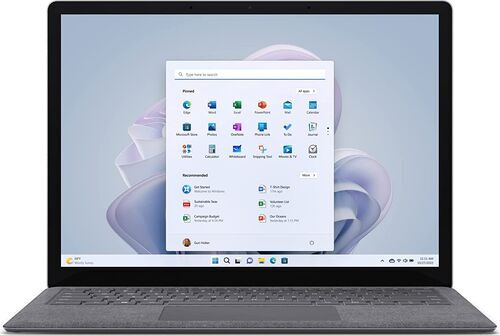
Windows Home vs Pro, Arm and Copilot+: what changes in daily life
Windows laptops come in many forms, and each choice changes daily life in a documented way.
- Home: runs everyday apps, games and many development tools, and eligible laptops get Device Encryption. WSL 2 covers Linux command-line work.
- Pro: adds the Remote Desktop host, the Hyper-V role, work or school domain join, full BitLocker administration and more policy controls. It does not make a laptop faster or extend update support: Home and Pro get the same 24 months.
- x64 or Arm: Windows on Arm runs many x86 and x64 apps through emulation, and the Xbox app arrived on Arm in January 2026. A kernel driver must be built for Arm, so test your VPN, audio interface, printer and games before you buy.
- Copilot+ or standard: Copilot+ is an optional tier that needs an NPU rated at 40 TOPS or more, 16 GB of memory and 256 GB of storage. A standard laptop that meets the requirements still runs Windows 11. The AI laptop RAM guide covers the memory side.
Each choice has a condition: the edition by the capability you need, the chip by the software you have verified, and the AI tier by a workload that uses it.
How much RAM and storage does a Windows laptop need?
The official Windows 11 floor is 4 GB of RAM and 64 GB of storage. It decides whether Windows installs, not how your work feels. Practical starting points are a judgment, not a Microsoft minimum:
- General use: a supported processor, an SSD and 16 GB of RAM. A 512 GB SSD is a useful start.
- Light use on an existing laptop: 8 GB can be workable with an SSD.
- Heavy multitasking or development: 32 GB of RAM and 512 GB to 1 TB of storage.
- Photo, video and motion work: 32 GB for lighter projects, 64 GB or more for complex ones, often with 1 TB of storage or more.
- Gaming: 16 GB serves many titles, 32 GB suits demanding games and mods, and the graphics chip often decides the result.
TechSpot's controlled January 2026 tests found many games performing similarly at 16, 32 and 64 GB, while 8 GB hurt frame times. Puget Systems' workstation tests put 16 GB about 20% below 64 GB overall in Photoshop and 43% below in After Effects: application results, not Windows overhead.
Windows laptops vary widely, so check the exact model's service information: storage is often replaceable and RAM often soldered. Prefer expandable memory if your future work is uncertain.
What changed in Windows updates from 2023 to 2026
- Late 2023: separate taskbar buttons and labels came back, the volume mixer improved and Windows read more archive types. Some of this restored older options, and the revised File Explorer drew responsiveness complaints.
- 2024 and 24H2: a larger platform update with more efficient update packaging, Wi-Fi 7 support on suitable hardware and improvements for Arm laptops. WordPad and Windows Mixed Reality were removed, and app recommendations reached Start, with a setting to switch them off.
- 2025 and 25H2: an enablement package, Quick Machine Recovery and selected File Explorer improvements. PowerShell 2.0 was removed, but not modern PowerShell. Local AI features carry hardware and rollout conditions.
- 2026 and 26H2: more Start customisation, taskbar placement options and grouping of eligible updates to reduce restarts. Delivery is phased, so two laptops can show different features.
The timeline runs on two tracks: the platform underneath, and an interface and apps that change all year. A removed feature can matter more than a small speed gain: Windows Mixed Reality users lost a platform dependency that more RAM cannot restore. Control over Start and the taskbar has been coming back.
Do Windows updates slow down a laptop?
Not as a rule. The evidence points both ways, and 'slower' has five meanings: memory pressure, processor or graphics speed, interface lag, storage and background work, and power and heat.
Gains exist, each with limits. Microsoft's own 24H2 tests showed monthly updates installing in roughly 44 to 46% less time: installation, not whole-laptop speed. TechSpot's gaming tests found averages about 10% to 11% better in a 24H2 preview, and 25H2 about 4% to 5% ahead in a Windows 10 versus Windows 11 comparison across 14 games. That second test ran on a high-end desktop with antivirus scanning and some security features off, so it says little about an ordinary laptop. One tech outlet saw up to about 2 GB less RAM in use after 26H2 on one laptop: a first impression without controls.
One forum thread reports a 16 GB laptop taking about 20 seconds to open File Explorer, against about 3 seconds under Windows 10, until startup items were disabled; other replies differed. Real faults are on record as of 7 October 2026: an Intel IPF power and performance issue, fixed on 18 July for a limited set of devices; older apps that depend on AC3 audio, failing or crashing after the 22 September update; and selected USB Audio Class 1.0 devices, with a mitigation available.
No failure rate exists, because a list of incidents does not count unaffected laptops. Updates can make existing hardware faster or easier to maintain, and 26H2 is too new to judge.
Six beliefs about Windows updates and hardware, tested
- Updates always make Windows heavier: too broad. Complaints and confirmed driver faults are real, but controlled tests also show gains. Name the workload and the hardware.
- More RAM fixes update problems: only when capacity is the bottleneck. It will not repair an AC3 compatibility fault, a bad power driver or a removed feature.
- 32 GB is the new minimum: not for Windows or gaming in general. Many tested games are comfortable at 16 GB, and demanding content work can need far more.
- Pro is faster or gets longer updates: unsupported. Home and Pro share the platform and the same 24-month feature-release period.
- An Arm laptop cannot do serious Windows work: too categorical. Emulation and gaming support have progressed, so verify every essential dependency before you buy.
- Three years of updates guarantee a useful life: not enough. The Windows lifecycle, the maker's firmware and your workload are three separate clocks.
Keep, repair or replace: a checklist for your Windows laptop
Before you spend money, test whether an update made the laptop worse. Note the Windows version and build, the update, the BIOS and driver versions and the symptom. Then time the same four tasks, more than once: open a File Explorer folder, run your usual browser workload, do one work task, and test sleep and resume. Change one cause at a time and keep a recovery route.
Together, these steps separate four outcomes: a real Windows regression, a driver or app interaction the update exposed, temporary servicing work, or a workload that has outgrown the laptop. Only the last necessarily supports buying hardware.
- Version and support: the Windows version's end date, a supported processor, TPM 2.0 and Secure Boot, and the maker's firmware policy for the exact model.
- The bottleneck: repeated paging points to RAM, a full or slow drive to more storage or an SSD, a removed feature or a bad driver to neither. Check whether this model's RAM and storage can be replaced.
- Apps, devices and edition: test the exact ones you rely on, and pick Home or Pro by the capability you need.
Keep a supported laptop that stays responsive in its actual work. Repair or upgrade the measured bottleneck where the model allows it, buy Pro for controls you need, and add memory or an AI tier for a workload that uses it. Before firmware work, save your settings and recovery key.
When it is time for another laptop, browse refurbished Lenovo, Dell, HP, Microsoft, ASUS and Acer laptops, and use the laptop buying guide to narrow them down.
Frequently asked questions about Windows updates
How long do Windows laptops get updates? Home and Pro feature releases get 24 months of servicing: Windows 11 25H2 is supported through 12 October 2027 and 26H2 through 10 October 2028. The maker's firmware support is a separate clock, so check both dates on any refurbished laptop.
Do Windows updates slow down a laptop? Not as a rule. Tests show both gains and faults, and 'slower' can mean memory, speed, lag, storage work or heat. Decide which you see, then check drivers, startup items and known issues.
Can I keep using Windows 10 on a laptop? Yes, but standard support ended on 14 October 2025. Eligible, enrolled consumer devices can get Extended Security Updates through 12 October 2027, a security-only bridge. Terms vary by country.
Do I need Windows Pro? No, unless you need a Pro capability. Pro does not make a laptop faster or extend updates. It adds the Remote Desktop host, Hyper-V, domain join and full BitLocker administration. Home already has Device Encryption on eligible laptops and WSL 2.
How much RAM does a Windows laptop need? Windows 11 needs 4 GB, but 16 GB and an SSD are a sensible start for a new laptop. 8 GB can work for light use and 32 GB suits heavier work. Laptop RAM is often soldered, so check the exact model.
Does a Windows laptop need an AI chip? No. A supported laptop without an NPU runs Windows 11. Copilot+ is an optional tier with its own hardware floor, and Recall is opt-in, with pause, delete and filter controls.
What if an update makes my laptop worse? Record the Windows version and build, the update, the driver and the symptom. Match it to an official issue by device and driver, change one thing at a time and keep a recovery route.
Find your next refurbished Windows laptop on refurbed
Check the Windows version, count the clocks and choose the memory and storage that fit your work. Every refurbed purchase carries a minimum 12-month warranty and a 30-day return window.

Sign up for our newsletter for the first time and save €15!
Never miss an offer again.
Information about the use of personal data can be found in our Privacy policy.
Get the refurbed app
For iOS and Android


Confirm sign-up
Almost done: We’ve sent you a confirmation email
- © Refurbed Marketplace GmbH
- Accessibility
- T&C
- Privacy Policy
- Imprint
- Legal Notices
- European Data Act
- Cookie Policy